Discreet options help you get help without drawing attention.
Trusted Contacts Alerted
The right people are alerted instantly with verified details.
Personal Coordinator
A real person reviews and manages your case with care.
911 Supports
Coordinators can conatct 911 and share what matters most.
Supports 911 - does not replace 911.
Emergency response depends on circumstances, connectivity, and available services.
When you cannot speak
Some emergencies are silent, fast-moving, or too dangerous to explain out loud.
01
When Someone Is Nearby And You Cannot Speak
02
You are hiding
03
You Are Being Chased
04
You Are Being Attacked
05
You are injured
06
You are confused
07
You are being followed
08
You do not know where you are
09
When Calling 911 Will Escalate The Danger
Even when you cannot explain the emergency, your identity, precise location, and urgent signal can still reach trusted contacts and a personal coordinator.
Silent urgent signal
Precise GPS location
Trusted contacts
Personal coordinator
What gets sent when you activate help
When you trigger an urgent signal, key information can be shared instantly so the right people can respond faster.
Automatically sent
Always shared when you acticate the help.
Name
Phone number
GPS location
Incidents type/details
Time stamp
Optional Personal Information
Optional & Voluntary
You can choose to add extra information to support a safer, faster response.
Medical conditions
Allergies / Medications
Blood type
Emergency contact
Shared only to help during an emergency
Secure. Encrypted. Private.
Shared only with the people involved in helping you during an emergency.
The right information. To the right people. At the right time.
your privacy. our promise
My Gaurdian Link current products
The platform is designed as a flexible infrastructure layer that supports multiple user needs and deployment models.
1. URGENT ASSIST
Rapid help when you need it most.
2. ROADSIDE ASSISTANCE
Get back on the road quickly and safely.
3. URGENT MEDICAL ASSISTANCE NEW RELEASE
Connect to medical help when every second counts.
4. SEE SOMETHING, SAY SOMETHING
Report concerns. Help keep communities safe.
5. Trusted Contact Assist FREEMIUM
Notify one trusted contact so they can respond and support you.
6. FALSE ALARM WORKFLOW
Confirms accidental activations quickly and helps prevent unnecessary escalation.
7. TORNADO ALERT FUTURE RELEASE
Real-time alerts and guidance when severe weather threatens.
8. WILDFIRE ALERT FUTURE RELEASE
Stay ahead of wildfire risk with timely alerts and updates.
One platform. Protection for individuals, families, teams, and organizations.
Your Protection. Our Technology. Always Connected.
Protect My Organization
Sponsor Group
Any current user — even a free user — can create an organization after creating a My Guardian Link account.
Access your dashboard on the My Guardian Link desktop website and, under Organization, create Protection for My Organization.
Create a Sponsor Group by uploading a list of employees or associates. My Guardian Link helps notify them for onboarding, and associates can join using the QR code, invite link, or group code.
Create a Sponsor Group
Start as a current user, even on the free plan.
1
Upload Associates
Upload a list of employees or associates.
2
Invite and Onboard
We notify your associates to log in and create their own accounts.
3
Connect to Your Organization
Associates can join using the QR code, invite link, or group code.
4
Special pricing available for 4 to 2,000 users
An employee benefit that shows your people they are valued, protected, and never alone.
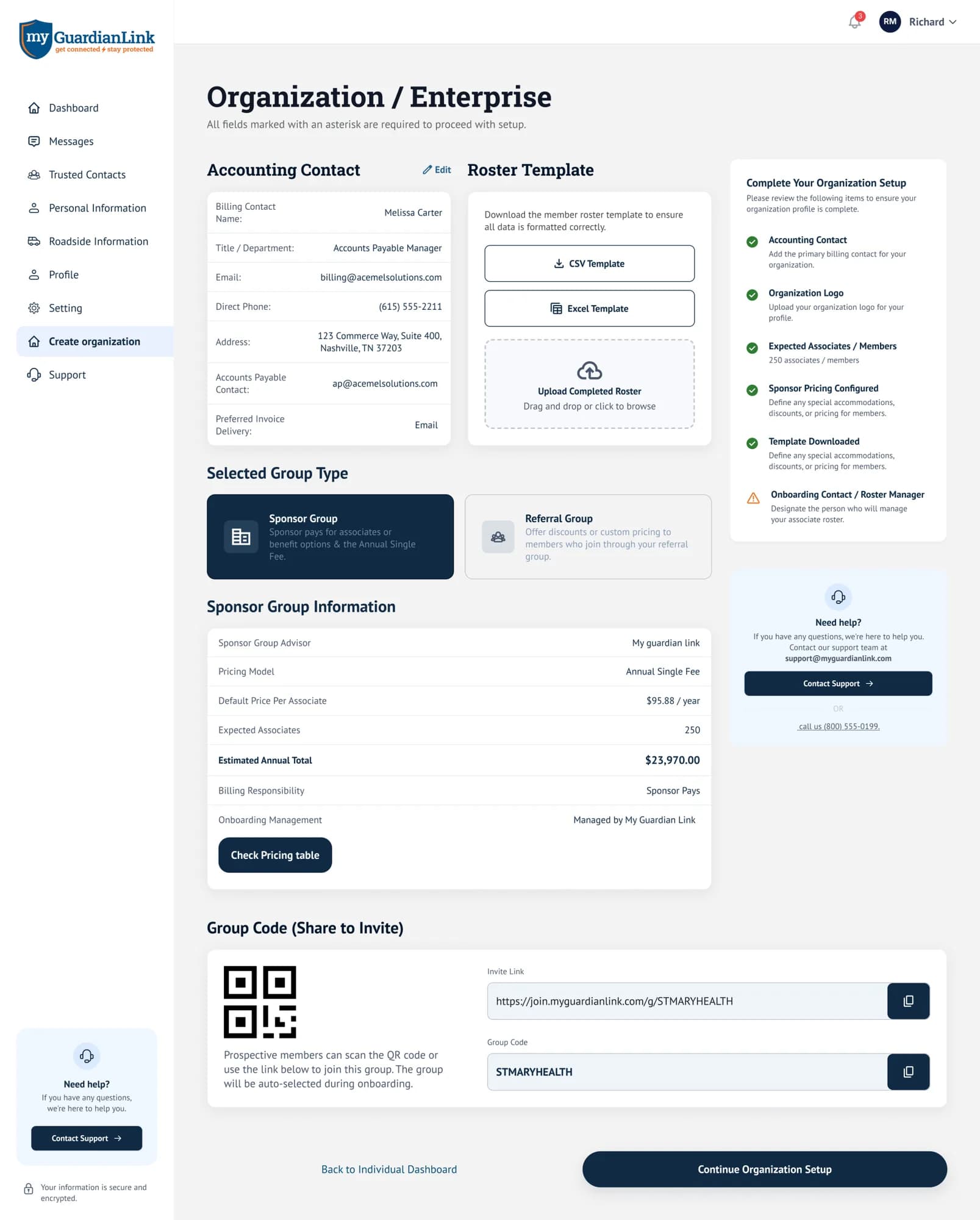
Sample Pricing and Onboarding Tools
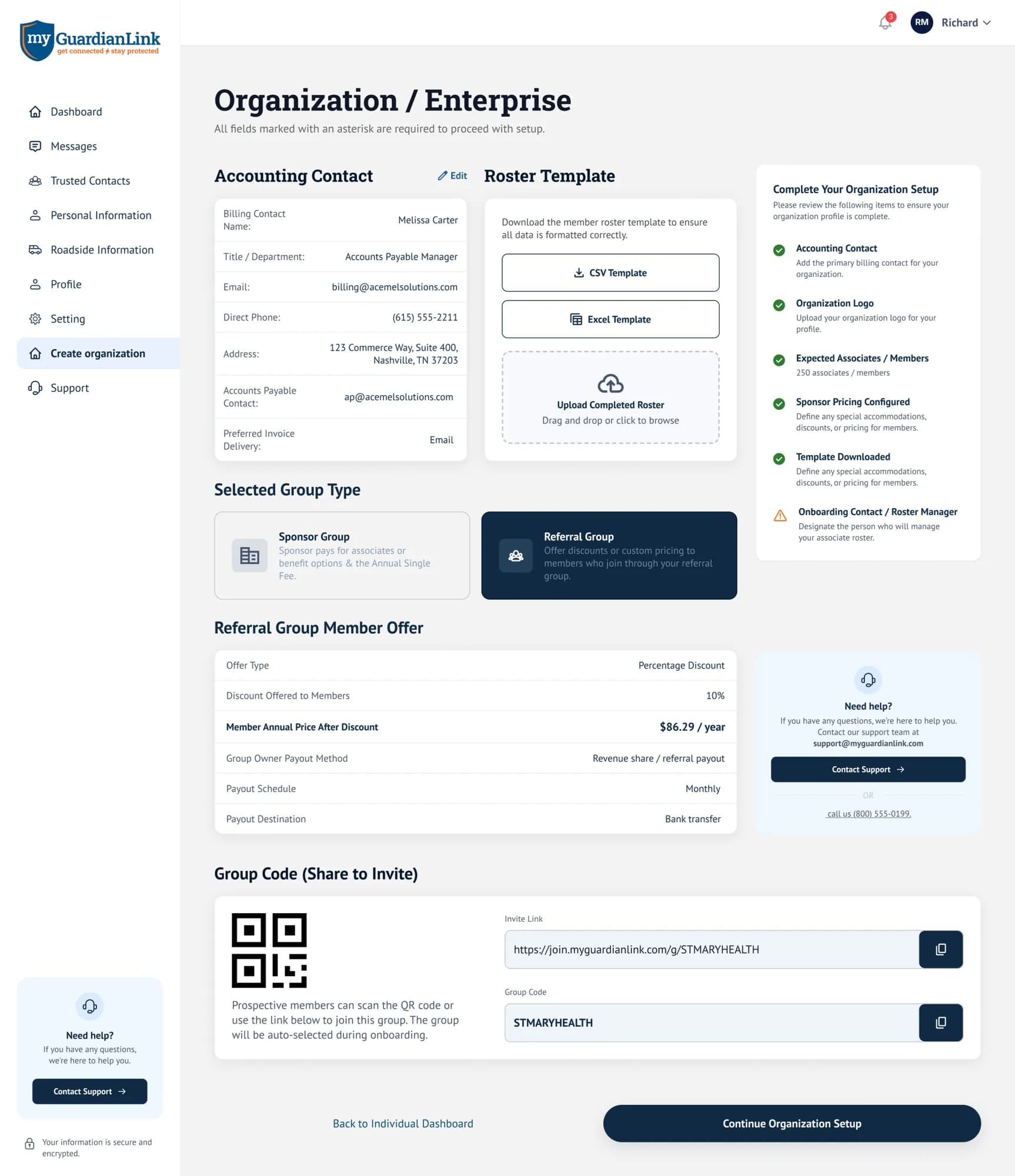
This is what it looks like in the Organization Portal.
An employee benefit that shows your people they are valued, protected, and never alone.
Loading...
Explore Referral Groups
Referral Group
Any current user — even a free user — can create a referral group after creating a My Guardian Link account.
Access your dashboard on the My Guardian Link desktop website and, under Organization, create a Referral Group.
A referral group is for anyone who influences a prospective user to join My Guardian Link — including radio stations, nonprofits, philanthropic groups, veteran organizations, community groups, and other audience-based partners.
Create a Referral Group
Start as a current user, even on the free plan.
1
Upload a Target List
Upload a targeted list for higher referral compensation, or leave it blank.
2
Share and Refer
Promote your group to your audience, members, listeners, or community.
3
Earn Recurring Revenue
Compensation is paid while memberships remain active.
4
Special pricing and discounts may be available for worthy groups
Examples may include veterans groups, battered women's groups, nonprofits, and other mission-driven organizations. Approval is determined by My Guardian Link support.
Referral Compensation and Group Tools
This is what it looks like in the Organization Portal.
With Uploaded Target List
Year 1
15%
Year 2
7%
Year 3
5%
Applies when a targeted list is uploaded.
Without Uploaded List
Year 1
10%
Year 2
5%
Year 3
3%
Applies when the target list is left blank and users join through the referral group.
Compensation is recurring and paid monthly on active memberships only. If a user cancels, compensation stops. Special pricing and discounts must be approved and determined by the My Guardian Link support team.